
Project Documentation
MoviLog is a high performance Android application built with Kotlin and Jetpack Compose. As 3rd year IT students, our goal was to create a tool for movie enthusiasts to discover, track, and organize their cinematic journey. By leveraging the TMDB API and a local Room database, MoviLog allows users to manage a personal watchlist, record watched movies with custom ratings, and build curated collections.
Core Features
- Real time Discovery: Browse Popular, Top Rated, Upcoming, and Now Playing films fetched directly from The Movie Database.
- Smart Search: Instant filtering of the global movie database to find specific titles.
- Comprehensive Tracking:
- Add movies you want to see to your watchlist
- Mark films as seen including the specific date and a personal 1 to 10 star rating.
- Custom Collections Create and manage unique lists.
- Viewing Insights A dedicated statistics dashboard featuring a monthly activity map and top rated favorites.
Technical Stack
| Language | Kotlin |
| UI Framework | Jetpack Compose Declarative UI |
| Architecture | MVVM Model View ViewModel plus Repository Pattern |
| Networking | Retrofit 2 and OkHttp |
| Local Database | Room Persistence Library |
| Image Loading | Coil |
| Navigation | Jetpack Compose Navigation |
Setup and Installation
To run MoviLog on your local machine, follow these steps:
- Prerequisites Ensure you have Android Studio Ladybug or newer, JDK 11 plus, and an API Key from The Movie Database.
- Configure the API Token Open com.example.movilog.ui.MovieViewModel.kt and locate the token variable. Replace the placeholder string with your TMDB v4 Read Access Token.
- Build the Project Clone the repository, sync the project with Gradle files, and run the application on an emulator or physical device with Min SDK 24.
System Architecture
MoviLog follows the MVVM pattern to ensure the UI remains reactive and the business logic is decoupled from the Android framework.
Data Layer
- Remote: TmdbApiService handles REST API calls to TMDB.
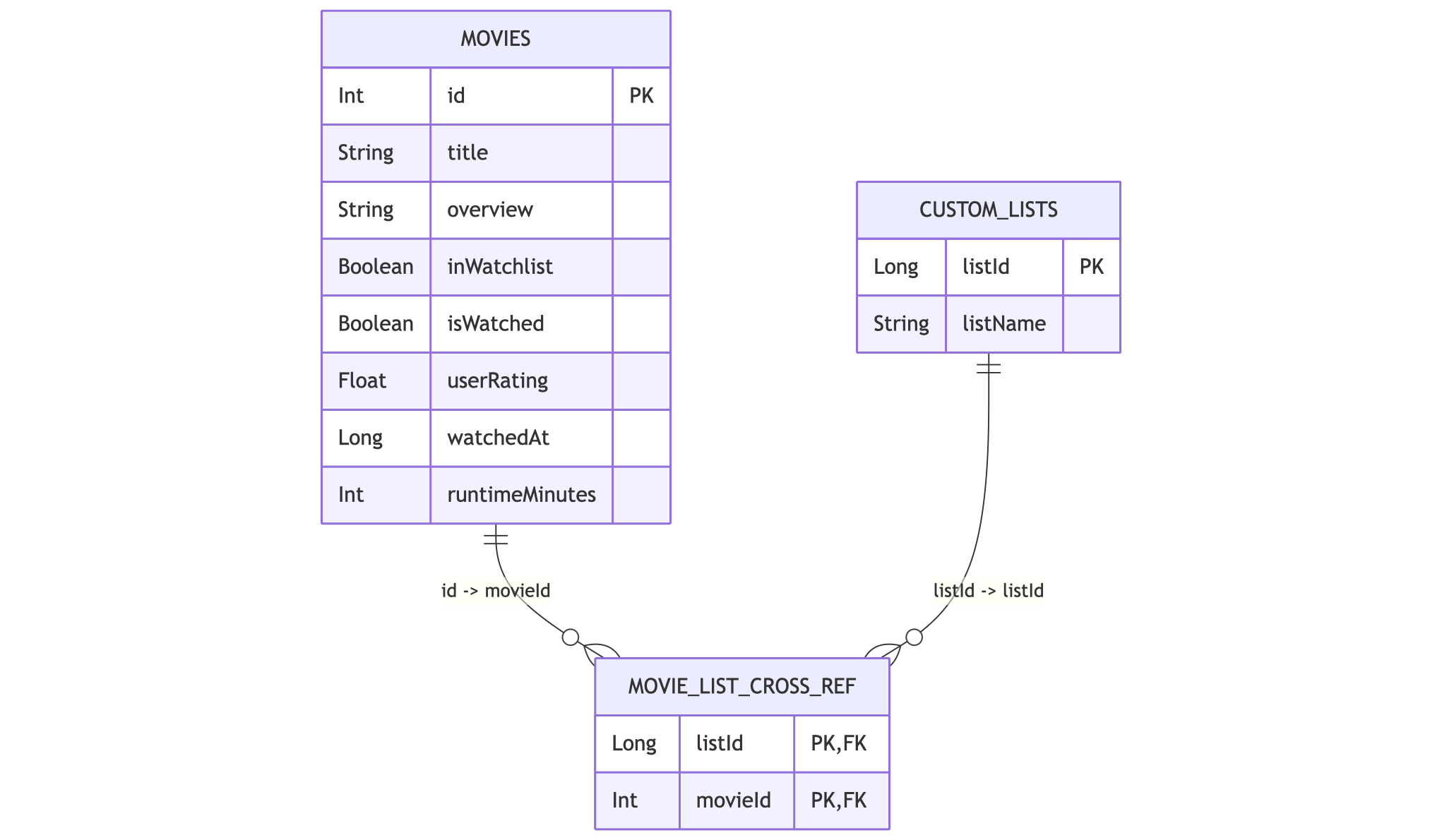
- Local: AppDatabase uses Room to store Movie entities and CustomList relationships.
- Repository: MovieRepository acts as the single source of truth mediating between network data and local persistence.
ERD Diagramm
UI Layer
- Navigation: AppNavHost.kt manages the screen transitions and argument passing.
- State Management: MovieViewModel exposes StateFlow objects that the Compose UI observes to reflect data changes immediately.
UI Colors
- Background: Deep Navy #0B2A36
- Accent: MoviLog Yellow #F2B400
- Typography: Cinematic styling using the Oswald font family.